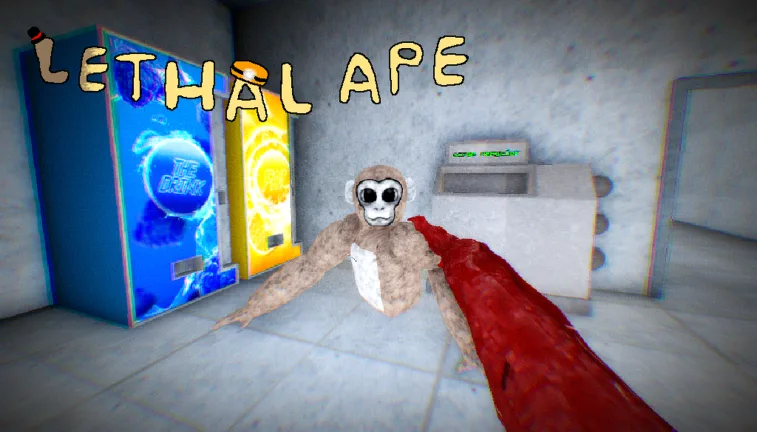
Lethal Ape Guide: Platforms, Gameplay, and Community Insights
Explore the world of Lethal Ape, a popular survival horror game. Get the latest info on its Roblox and VR versions, gameplay tips, and community status.
Published: Lethal Ape Wiki Editorial Team
Table of Contents
Understanding the Lethal Ape Ecosystem
The name "Lethal Ape" covers a variety of experiences in the gaming landscape, primarily split between the accessible Roblox platform and dedicated Virtual Reality (VR) applications. Understanding which version you are interacting with is crucial, as the gameplay mechanics and developer support vary significantly between the two.
The Roblox version, hosted under the official Lethal Ape experience, is a highly popular social survival game. Conversely, "Lethal Ape 3" is a distinct VR-centric title found on the Meta Quest store, focusing on immersive horror mechanics. Both versions share a core theme of evasion and tension, but they operate on different engines and infrastructures.
Playing Lethal Ape on Roblox
The Roblox iteration of Lethal Ape, developed by gub_dev, emphasizes social interaction and high-stakes survival. Players often join various servers to coordinate with friends or strangers to avoid being caught.
Tip
If you experience trouble connecting to a specific server, it is often due to the session being at maximum capacity. Try switching to a different server index (e.g., from Server 1 to Server 2) to bypass connection errors.
The gameplay on Roblox is fast-paced and often chaotic. Based on community observations, players frequently use movement techniques—sometimes colloquially referred to as "breaking ankles"—to outmaneuver predators. This involves quick direction changes and utilizing the physics of the game to gain distance from the pursuer. If you are new to the game, focus on learning the map layout first to ensure you have multiple escape routes available during a chase.
Exploring Lethal Ape 3 on VR
"Lethal Ape 3" offers a more tailored horror experience designed for Meta Quest 2, 3, 3S, and Pro headsets. As a survival horror game set in a laboratory environment, it utilizes the immersive nature of VR to heighten the tension of being hunted.
Platform Support: Ensure your headset is updated to the latest firmware for optimal performance.
Space Requirements: The game requires approximately 383.3 MB of storage space.
Comfort Level: The game is rated "Moderate" for comfort, so take frequent breaks if you are prone to motion sickness.
Community feedback highlights that the game provides a visceral experience, but it is currently in an Early Access state. This means the developer, Monkey builders, may frequently adjust features. Some players have expressed concerns regarding server availability, with reports suggesting that developers sometimes redirect players toward other titles like "Brick Tag."
Tips for Survival and Gameplay
Regardless of the platform, the primary objective in any Lethal Ape experience is survival. The following strategies are commonly shared by veteran players to help you last longer:
Stay Quiet: In VR versions, microphone input can sometimes be a factor in detection. Be mindful of your surroundings and your own noise levels.
Map Knowledge: Memorize the locations of vents, doors, and hiding spots. Knowing where a dead end is can save your life.
Team Coordination: If the mode allows for multiplayer, stick with your teammates. You are more likely to survive if someone is watching your back or distracting the monster.
Manage Your Battery: In VR, ensure your controllers are fully charged. A low-battery controller can lead to tracking issues during crucial escape sequences.
Community Feedback and Updates
The community surrounding the Lethal Ape series is very vocal about updates and game stability. Many reviews on the Meta Quest store emphasize a desire for more diverse monsters and additional survival mechanics, such as resource gathering or item management.
Warning
Be aware that some "Lethal Ape" titles are subject to sudden shutdowns or re-brands. If you encounter a message stating a game has been shut down, check the developer's official social media or the platform's game page for news on potential migrations or updates.
Players often debate the "best" version of the game. While some prefer the simplicity and social aspect of the Roblox version, others prioritize the immersion of the VR title. Always check the "About" section on the respective game page to see when the last update was released, as this is a good indicator of whether the game is currently being actively maintained.
FAQ: Common Questions
Is Lethal Ape free to play?
Most versions of Lethal Ape on Roblox are free, though they may contain optional in-game purchases. The VR version on Meta Quest may have its own pricing model; always check the official store page before downloading.
Why can't I find a server in the game?
Server issues are common in high-traffic games. If you cannot join a server, it is likely full. Keep refreshing or try joining a less populated server instance.
Can I play Lethal Ape on PC without a headset?
The VR versions of Lethal Ape are built specifically for VR hardware. While Roblox versions are accessible via PC, the VR-specific titles generally require a compatible headset to function correctly.