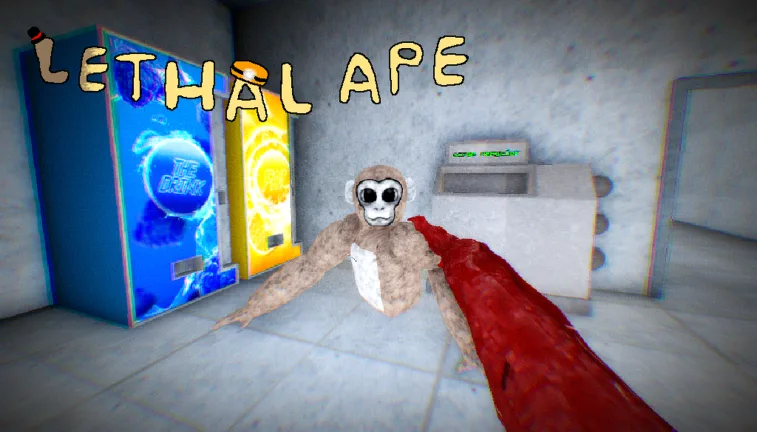
Lethal Ape 2 on Meta Quest: Everything You Need to Know
Discover the details of Lethal Ape 2 on the Meta Quest platform, how it differs from the popular Roblox title, and what players can expect from this VR experience.
Published: Lethal Ape Wiki Editorial Team
Table of Contents
Understanding the Difference: Lethal Ape vs. Lethal Ape 2
In the world of online gaming, similar titles often cause confusion, especially when popular concepts spawn multiple iterations across different platforms. It is essential for players to distinguish between the various "Ape" themed games currently trending.
The game titled Lethal Ape 2, available on the Meta Quest store, is a separate entity from the widely recognized Lethal Ape game hosted on the Roblox platform. The Roblox version, developed by gub_dev, is a specific experience within that ecosystem. If you are searching for the Roblox version, you will not find it in the Meta Quest store, and conversely, the Meta Quest version is not playable via the Roblox application.
When searching for your preferred version, always check the developer name. The Meta Quest version of Lethal Ape 2 is developed by MetroDev, whereas the Roblox original is managed by gub_dev. Being aware of these developer credits helps ensure you are downloading the specific experience you intend to play.
What is Lethal Ape 2 on Meta Quest?
Lethal Ape 2 is a dedicated VR platformer and action game designed specifically for the Meta Quest headset ecosystem. Unlike browser-based or engine-based games like those on Roblox, this title leverages the immersive capabilities of virtual reality, utilizing features like hand tracking and room-scale movement to create a tactile experience.
The core gameplay loop centers on exploration. Players are dropped into a map where the primary objective is to navigate the environment, uncover hidden areas, and discover secrets. It is designed to be a social experience where you can interact with friends or other players within the virtual space. The gameplay is described by the developer as being "made for fun," emphasizing a relaxed, exploratory pace rather than high-pressure competitive mechanics.
Key Features of the Experience
Immersive Platforming: Using the VR controllers, players navigate obstacles and environments, providing a more physical sense of scale than traditional screen-based platformers.
Multiplayer and Solo Modes: The game supports both single-user exploration and multiplayer sessions, allowing for social interaction.
Hand Tracking and Sensor Data: The app utilizes the Meta Quest’s sensor capabilities, including hand tracking and microphone support, to enhance immersion.
Roomscale Support: Designed to work with various play styles, including standing and room-scale setups, providing flexibility for different play areas.
Gameplay and Exploration
The appeal of Lethal Ape 2 lies in its open-ended nature. Rather than being a strictly linear experience with a singular goal, it encourages players to "mess around" and discover what the environment has to offer.
Tip
Optimizing Your Play Area
Since this is a platformer that utilizes room-scale technology, ensure your physical play space is clear of obstacles. Because the game involves active movement and exploration, a clear, open floor area will significantly improve your comfort and safety while playing in VR.
Players can expect a focus on traversal. In VR, the sensation of jumping, climbing, or moving through 3D environments is fundamentally different from using a mouse and keyboard or a standard controller. The "Platformer" genre in VR relies heavily on depth perception, which is why the Meta Quest’s tracking capabilities are central to the game's design.
Community Reception and Developer Context
As with many games in the "Ape" sub-genre, the community is highly active and vocal. Reviews on the Meta Quest store indicate a generally positive reception, with a 4.7-star rating based on early feedback. Players have highlighted that the game avoids aggressive "pay-to-win" mechanics, which is a common pain point in many modern mobile and browser-based games.
However, the nature of these viral game titles often leads to community debates regarding "authenticity." You may encounter reviews or forum discussions claiming that a specific version is "fake."
Warning
Navigating Community Disputes
You may see conflicting reviews from users debating which version of a game is the "real" one. Developers often address these concerns directly in the store comments. For instance, the developer of Lethal Ape 2 (MetroDev) has publicly stated that they received permission from original owners to create this iteration. Always prioritize the developer's official statement on the store page over hearsay in user reviews.
Technical Requirements and Compatibility
To ensure a smooth experience, it is important to understand the hardware requirements. Lethal Ape 2 is built for the Meta Quest ecosystem.
Supported Headsets: The game is compatible with Meta Quest 3S, Meta Quest 3, Meta Quest Pro, and Meta Quest 2.
Storage: The application requires approximately 568.58 MB of space.
Internet Connection: While multiplayer features require a connection, the game does not strictly demand an internet connection for all functions, though social features will be limited without one.
Comfort Level: Rated as "Moderate," which is standard for VR games involving locomotion. If you are new to VR, take frequent breaks to acclimate to the movement.
Frequently Asked Questions
Is Lethal Ape 2 the same as the Roblox Lethal Ape?
No. Lethal Ape 2 (Meta Quest) and the Roblox Lethal Ape (by gub_dev) are entirely different games built on different platforms. They do not share servers or save data.
Can I play this on a PC or console?
This specific title is optimized for the Meta Quest VR platform. It is not listed as a standard PC or console game outside of the Meta/Horizon ecosystem.
Is the game free to play?
The Meta Quest store page allows users to "Get" the app. Always check the official Meta Quest store page for the most current pricing and availability, as store policies can change.
What should I do if I experience motion sickness?
The game has a "Moderate" comfort rating. If you feel dizzy, stop playing immediately. You can often adjust movement settings in the game menu if available, or try using a "teleport" locomotion setting if the game provides one.
Final Thoughts for New Players
If you are looking to dive into Lethal Ape 2, the best approach is to treat it as a sandbox environment. Focus on the exploration aspects, try out the social features with friends, and enjoy the unique perspective that VR brings to the platformer genre. Always verify the developer name as "MetroDev" on the Meta Quest store to ensure you are accessing the intended content. By understanding the distinction between this VR experience and other similarly named games, you can avoid confusion and jump straight into the fun.